Tug,
Since I found out you're a karaoke freak like myself, you're in my sights now 🙂
I need an AVS that can show what frequency something is playing at. I would use this in my karaoke show, as i'm sure a lot of others would.
My main use for it would be to open "line in" on winamp, then cause feedback on my mic. I would use this AVS you're going to create for me so I know where I need to tune my parametric EQ to eliminate the frequency.
It would kind of look like this attatchment, just a bar that shows what frequency is comin through winamp.
Tuggumi help my karaoke please!!!
13 posts
Use the spectrum analyser, its quality can't be made any better using AVS since Winamp limits the number of samples.
What spectrum analyzer?
Heh, sorry, but im not good at all at techy stuff. I don't know how to make something like that.
This is one for PAK-9 or UnConeD really... I dont know what the scale is on the Winamp spectrum analyser, or I would make a pretty version with labels for you :/
Re: Tuggumi help my karaoke please!!!
I was sort of avoiding this topic; toqer, you're kinda all over the place with your signal processing knowlege.
If you just want to display a spectrum make a new avs and add a render/simple. The far left is DC (you can think of it as 0Hz) and the far right is the nyquist frequency (the sample rate of the input divided by 2)
I cant help you any further without you explaining what you want more eloquently.
I was sort of avoiding this topic; toqer, you're kinda all over the place with your signal processing knowlege.
Originally posted by toqerThere are many frequencies in music and singing, you can display which frequencies are present using spectral analysis. In AVS this just means adding a render item which will plot a spectrum.
I need an AVS that can show what frequency something is playing at. I would use this in my karaoke show, as i'm sure a lot of others would.
Originally posted by toqerI dont really follow you here.. you want to use AVS to eliminate mic feedback? If so thats an incredibly convoluted way of doing so, just fiddle with the gain settings, read the mic manual or something. If you are talking about removing the voices from songs then you need to bandpass filter the music (which doesnt have anything to do with the mic)
My main use for it would be to open "line in" on winamp, then cause feedback on my mic. I would use this AVS you're going to create for me so I know where I need to tune my parametric EQ to eliminate the frequency.
If you just want to display a spectrum make a new avs and add a render/simple. The far left is DC (you can think of it as 0Hz) and the far right is the nyquist frequency (the sample rate of the input divided by 2)
I cant help you any further without you explaining what you want more eloquently.
Well I already did it this saturday, just without AVS though 🙁 It worked perfectly! I had my friend zugzug (creative labs engineer) help me out by walking around the room with the mics.
I found this nice little ocilloscope package.
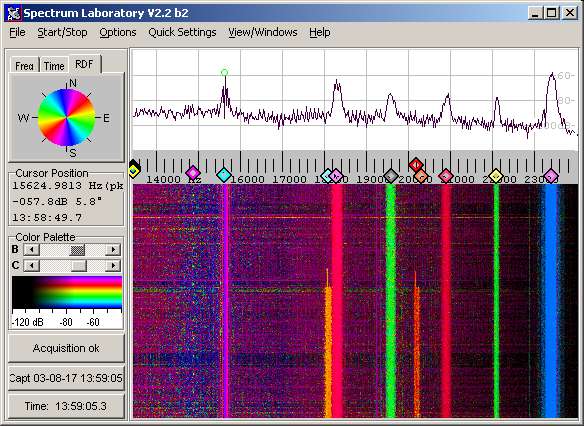
Basically what we did was, turn the mics up till we created feedback, then spectrum lab would draw a nice line on the waterfall display (sort of like that purple line on the left). I'd mouse over the line on the waterfall display, and it would give me the exact frequency of the feedback.
After finding the exact frequency, I added a parametric EQ tuned to that frequency on my 1820m's patchmix. Dial the bandwidth down so I wouldn't be notching out too much.
In all I added about 7 or 8 parametric EQ's to the mic inputs. We can krank up the volume to the max now with just a hint of some light high frequency feedback (like 15000hz range, barely noticable)
I don't understand why you guys always say "This or that can't be done in AVS". Oscilloscope and spectrum analysis is *all* avs does.
I found this nice little ocilloscope package.
Basically what we did was, turn the mics up till we created feedback, then spectrum lab would draw a nice line on the waterfall display (sort of like that purple line on the left). I'd mouse over the line on the waterfall display, and it would give me the exact frequency of the feedback.
After finding the exact frequency, I added a parametric EQ tuned to that frequency on my 1820m's patchmix. Dial the bandwidth down so I wouldn't be notching out too much.
In all I added about 7 or 8 parametric EQ's to the mic inputs. We can krank up the volume to the max now with just a hint of some light high frequency feedback (like 15000hz range, barely noticable)
I don't understand why you guys always say "This or that can't be done in AVS". Oscilloscope and spectrum analysis is *all* avs does.
I'm glad you got your idea working, just for the record we did try and help you, it was just hard to understand what you wanted exactly.
Nobody said that this could not be done in avs, we very rarely say that something cannot be done in avs, and when we do we generally give a pretty detailed description of why not. Also, oscilloscopes and spectrums are very basic stuff in AVS, they are not 'all' it 'does' however. One of the reasons people did not understand your request was that you asked for something so simple that people could not understand where the problem was.
I also suggest (dont take this as an insult) that you try to improve your language when talking about something technical as using the incorrect word can often hinder the readers ability to understand you. For example the program you linked is not an "ocilloscope package" its a spectrum analyser.
anyway sorry for the rant, have a preset I threw together
Originally posted by toqeroh dear, you shuldn'da said that 😔
I don't understand why you guys always say "This or that can't be done in AVS". Oscilloscope and spectrum analysis is *all* avs does.
Nobody said that this could not be done in avs, we very rarely say that something cannot be done in avs, and when we do we generally give a pretty detailed description of why not. Also, oscilloscopes and spectrums are very basic stuff in AVS, they are not 'all' it 'does' however. One of the reasons people did not understand your request was that you asked for something so simple that people could not understand where the problem was.
I also suggest (dont take this as an insult) that you try to improve your language when talking about something technical as using the incorrect word can often hinder the readers ability to understand you. For example the program you linked is not an "ocilloscope package" its a spectrum analyser.
anyway sorry for the rant, have a preset I threw together
Originally posted by PAK-9Yah but I find if I say semi offensive things, it generally improves folks response times 🙂
oh dear, you shuldn'da said that 😔
As far as my language, I was as descriptive as I could be. I'm sure you already know, you're dealing with someone who doesn't know *jack* about things in general. It's like asking the cat to recite the declaration of independance, it's impossible and isn't going to happen.
The preset looks hot. Better than spectrum lab. What window size should I use when I run it? Can I include it with my plugin? Mind if I make some suggestions?
--toq
It probably took more time for you to write that post than it did for me to make that preset, as I was trying to explain before its very basic stuff in AVS. You can do whatever you want with the preset, and feel free to make suggestions but you will find it is a lot more fun if you just try playing around with the preset yourself
My math is terrible, which is why my skills with AVS are limited to nothing more than render>text 🙁
I'll try this out at work on thursday and tune the presets labels to tones created from my 1820m. Thanks again pak-9
PS just some suggestion. Mouseover to display frequency in txt. I found this thread on finding out frequencies.
I'll try this out at work on thursday and tune the presets labels to tones created from my 1820m. Thanks again pak-9
PS just some suggestion. Mouseover to display frequency in txt. I found this thread on finding out frequencies.
You searched the forums and found a relevant thread, which is more than most noobs manage; however you fell at the second hurdle.. 'reading' the thread. If you read the thread you will notice that UnConeD explains why you cannot identify specific frequencies.
The fact that you cannot identify frequencies as a value is the reason the labels in the preset are expressed in terms of the sample rate, if you know the sample rate of your input then you can change the labels accordingly... and if you were really smart you would have a variable at the beginning of the preset where you could input the sample rate and it would change the labels for you and tell you the frequency at the cursor.
P.S. Your skills at AVS may be very limited but there is only one way they will get better (go here). On the forums we prefer helping people to help themselves
The fact that you cannot identify frequencies as a value is the reason the labels in the preset are expressed in terms of the sample rate, if you know the sample rate of your input then you can change the labels accordingly... and if you were really smart you would have a variable at the beginning of the preset where you could input the sample rate and it would change the labels for you and tell you the frequency at the cursor.
P.S. Your skills at AVS may be very limited but there is only one way they will get better (go here). On the forums we prefer helping people to help themselves
thanks for the link to the cool (super-deluxe) spectrum analyser, toqer; gotta love amateur radiomen