Think about the possabliites, a 3d maze controled by keyboard, a mini rpg game or a mouse contoled DM bump 😁 😁 😁
w00t w00t w00t
just imagine fragmer's Hybridium controled by mouse having a certain time limit to kill a certain amount of fish 😁 😁 😁
new AVS with mouse/kb support
60 posts
Code controlled effect lists. With the ability to turn off&on the el's with global variables or other vars. Now this would truly allow to make some real games without the lost of fps... Im just saying this because if there is really going to be avs games, then there should atleast be the tools to make some decent ones...
[edit]
okay, maybe not so real games, but a step more complex than pong's, worm or shooter games atleast...
[/edit]
[edit]
okay, maybe not so real games, but a step more complex than pong's, worm or shooter games atleast...
[/edit]
well, i think tug and nemo are being a tad dramatic.
I think this has definatly opened up a completely new avs field, but i dont think it will cause a split in the population. Myself, im planning on using it, no doubt about it, but that doesnt change how much i like to sit back and watch a good set of presets, without pressing buttons and moving the mouse.
Plus, this isnt the only new tool about, dont forget the countless evallib fixes and additions, colormod, global reg's etc, all of which arent really being explored by avsers yet, because they arent officially released.
I think you boys need to lighten up. This is a good thing. If people decide to switch to making games etc only, then they cant have been very good at visualisations in the first place, so it would be no great loss to the community.
I think this has definatly opened up a completely new avs field, but i dont think it will cause a split in the population. Myself, im planning on using it, no doubt about it, but that doesnt change how much i like to sit back and watch a good set of presets, without pressing buttons and moving the mouse.
Plus, this isnt the only new tool about, dont forget the countless evallib fixes and additions, colormod, global reg's etc, all of which arent really being explored by avsers yet, because they arent officially released.
I think you boys need to lighten up. This is a good thing. If people decide to switch to making games etc only, then they cant have been very good at visualisations in the first place, so it would be no great loss to the community.
I guess this is usefull as a kind of optional use for vj'ing like UCD pointed out. Somehow similar to what i want do do with LiveFX, but not exactly.
Justin, we've got one bug here: if i use the mouse or keys, the standard actions will still be executed like popup menu opening on rightclick or switching to fullscreen/editor opening on double leftclick.
These should be disabled as soon as thei're defined within the code.
Justin, we've got one bug here: if i use the mouse or keys, the standard actions will still be executed like popup menu opening on rightclick or switching to fullscreen/editor opening on double leftclick.
These should be disabled as soon as thei're defined within the code.
I've got some feeling UnConeD is going to upgrade his Wolfenstein...
🙂
Justin, you rule. This is just ... (GREAT*10^infinity)
And I agree with Magic and all the above when it comes to mouseclicking. Just keep the [Esc] function working, or else you can't return to normal mode.
🙂
Justin, you rule. This is just ... (GREAT*10^infinity)
And I agree with Magic and all the above when it comes to mouseclicking. Just keep the [Esc] function working, or else you can't return to normal mode.
An attempt at a interface for one of my presets. Go to the left-top corner and click 'Mouse 1' for control over the rotation, click 'Mouse 2' for size and color control. Texer II is required for this preset.
hehe man! with these new features the AVS-world is gonna change considerably.🙂😁
Hmmm... Jack, think mathword polyhedra models, the way they're mouse controlled? 😁
justin will this for sure be in winamp 5 AVS?
I'm happy and all, but please change the shortcut for fullscreen from doubleclick to something else. It really messes things up...
You'll have to turn this off yourself in the AVS fullscreen options. Or if you use the modern skin you can configure it so the vis options buttons opens the config instead of the context menu (this should be a default IMO).
Yeah that double click to full screen, put it back the way it was, double click for config.
there only one fear i have in my mind about this new AVS , with this new technology AVS n00bs like me who are still learning will no longer be recognized🙁
You do avs to be recognized?
Man, you're totally lost... 😔
Man, you're totally lost... 😔
nay tuggummi, it is you who is lost.
Avs is a tool to aid the recognition of geeks world wide. Need i direct you to the good book?
Chapter 1, Verse 2, the purposes of the holy tool:
"Advanced Visualisation Studio: What we (at Nullsoft) use to (try to) get chicks at parties"
amen
Avs is a tool to aid the recognition of geeks world wide. Need i direct you to the good book?
Chapter 1, Verse 2, the purposes of the holy tool:
"Advanced Visualisation Studio: What we (at Nullsoft) use to (try to) get chicks at parties"
amen
heh, amen to that then 🙂
Originally posted by WhiteRayven
Yeah that double click to full screen, put it back the way it was, double click for config.
Settings->Fullscreen Settings😉
[Checkbox] Doubleclick in main window goes fullscreen (instead of config)
hey tugg i do AVS for fun as well as to be recognized🙂
I found out a nice trick while coding interactive rotation on a DM. First I had the following code (state=1 means that the user has switched to interactive mode 1, more modes can ofcourse be coded as well):
I fixed this problem by checking if the interpolation is being done between either r1o<-0.5*pi and r1d>0.5*pi (r1o the last rotation, r1d the new one), ot r1o>0.5*pi and r1d<-0.5*pi. The coded version of that follows below:
It seems nice until you move over the mark between -pi and pi. The screen rotates very fast in the other direction, covering almost an entire circle. This is because of the r1=r1*0.9+r1d*0.1 interpolation. It does needs this, to make the rotation smooth. Otherwise the screen would jump if the user clicked somewhere.
init:

state=1


frame:

mxo=mx;myo=my;

mx=getkbmouse(1);

my=getkbmouse(2);

pl=if(below(abs(mx),1)*below(abs(my),1),getkbmouse(3),pl);


r1d=if(pl,atan2(mx,my),rmr);

r1=if(equal(state,1),r1*0.9+r1d*0.1,r1+r1r);


beat:

r1r=rand(10)/100-0.05;


pixel:

r=r+r1;d=d*0.5;
I fixed this problem by checking if the interpolation is being done between either r1o<-0.5*pi and r1d>0.5*pi (r1o the last rotation, r1d the new one), ot r1o>0.5*pi and r1d<-0.5*pi. The coded version of that follows below:
Try the two differents DM's and see the difference. I hope this will help you fix the problem if it happens in one of your own presets.
init:

state=1;


frame:

mxo=mx;myo=my;

mx=getkbmouse(1);

my=getkbmouse(2);

pl=if(below(abs(mx),1)*below(abs(my),1),getkbmouse(3),pl);


r1o=if(pl,atan2(mxo,myo),r1o);

r1d=if(pl,atan2(mx,my),r1d);

r1f=if(pl*bor(below(r1d,-0.5*$pi)*above(r1o,0.5*$pi),above(r1d,0.5*$pi)*

below(r1o,-0.5*$pi)),r1f-above(r1d,0.5*$pi)+below(r1d,-0.5*$pi),r1f);

r1=if(equal(state,1),r1*0.9+(r1d+r1f*2*$pi)*0.1,r1+r1r);


beat:

r1r=rand(10)/100-0.05;


pixel:

r=r+r1;d=d*0.5;
Skupers: For angle interpolation, I use:
a=a+sin(ta-a)*.1;
Works fine, except if the difference between ta and a is close to 180°.
a=a+sin(ta-a)*.1;
Works fine, except if the difference between ta and a is close to 180°.
When I try making your code go round in circles, sometimes it rotates a bit in the wrong direction. Is this that problem with 180 or is it just my preset?
I have the perfect idea for the fullscreen shortcut problem. A function that changes the hotkeys within the preset (like fullscreen(getkbmouse(whatever)) or something).
A shitty demo preset:
A shitty demo preset:
nice one atero. Maybe someone can remake UCD's Whacko AVS 6 - Strange Recursion.(i'm trying)
How do I know which keyboard key has which number?
if you take out all the keys, youll find that the number is written on the backside of each key.
🙂
or not
🙂
or not
That's not true, I tried it 😉. Me dumb fuck. Still, I also like to know which number is which key.
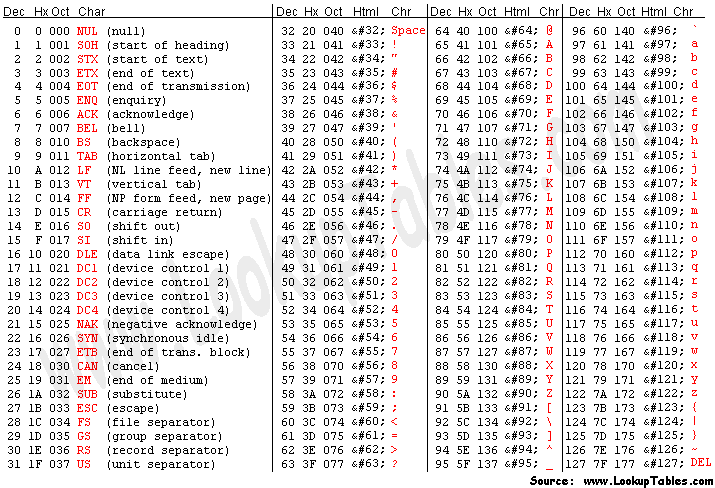
Ascii character table - What is ascii - Complete tables including hex, octal, html, decimal conversions
and oh yeah, avs reads all letters as caps so ignore the other letters
OMG...AVS got a huge boost since i last visited the forums...gotta check out all these new things 😁
ditto.
Gah with all these different threads, I misposted 😉.
Correct keycode listing at:

It's not ASCII.
Correct keycode listing at:
A space to talk about everything related to Winamp Advanced Visualization Studio. Look at the pretty lights.... If you have any troubleshooting questions, bugs, or feature requests, submit them to the AVS <b>SUB-Forums</b> instead of this one!
It's not ASCII.